
The software is rarely what stops a plant from moving off spreadsheets. What stops them is a quiet arithmetic problem: "we have 180 machines and 400 spare parts, and somebody is going to have to type all of that in."
So the workbook stays. It gets a little more out of date every month, one person still knows where everything is, and the whole thing quietly stays fragile.
The way out isn't heroic data entry. It's a CSV import — and the good news is that the file you need is almost certainly one you already have.
What you actually need to move
Not everything. Three lists, in this order:
- Your assets — the equipment register. Everything else hangs off this.
- Your spare parts — what's on the shelf and when to reorder.
- Your PM schedules — the recurring work.
That's it. Do not attempt to import history. Years of past work orders feel valuable and almost never are: nobody searches them, they're usually incomplete, and every hour spent cleaning them is an hour not spent getting the current week under control. Keep the old workbook as an archive. Start the new system with today.
Step 1 — Get your equipment list into one flat sheet
Open whatever you have and aim for one row per machine with these columns:
| Column | Notes |
|---|---|
| Name | What people call it — "Filler Head A", not "FIL-A" |
| Asset tag | Your identifier, and it must be unique |
| Category | Pump, conveyor, gearbox, filler… |
| Location | Line, area, or building |
| Status | Operational, down, maintenance, retired |
| Parent asset tag | The tag of the machine or line it belongs to |
Name and asset tag are the only two that are mandatory. Skip anything you don't have.
That last column is the one worth understanding, because it saves you the most work. A CMMS is far more useful when equipment is a hierarchy — a line contains machines, a machine contains components — so failures and costs roll up. You don't have to build that by hand. Put the parent's tag in the row, and the tree assembles itself on import:
Name,Asset tag,Category,Location,Parent asset tag
Packaging Line 2,LINE-02,Production line,Plant 4,
Filler Head A,FIL-A,Filler,Plant 4,LINE-02
Conveyor CV-9,CV-09,Conveyor,Plant 4,LINE-02
Three rows, and you've got a line with two machines under it.
Don't clean it first
The instinct is to tidy the spreadsheet before importing. Resist it — you'll spend a weekend and still get it wrong. Upload what you have and let the preview tell you what's actually broken. It's much faster to fix six flagged rows than to proofread four hundred good ones.
Step 2 — Upload it and check the preview
In MaintainFlow, Import CSV sits at the top right of Assets, Parts, and PM. Pick your file and you get this:
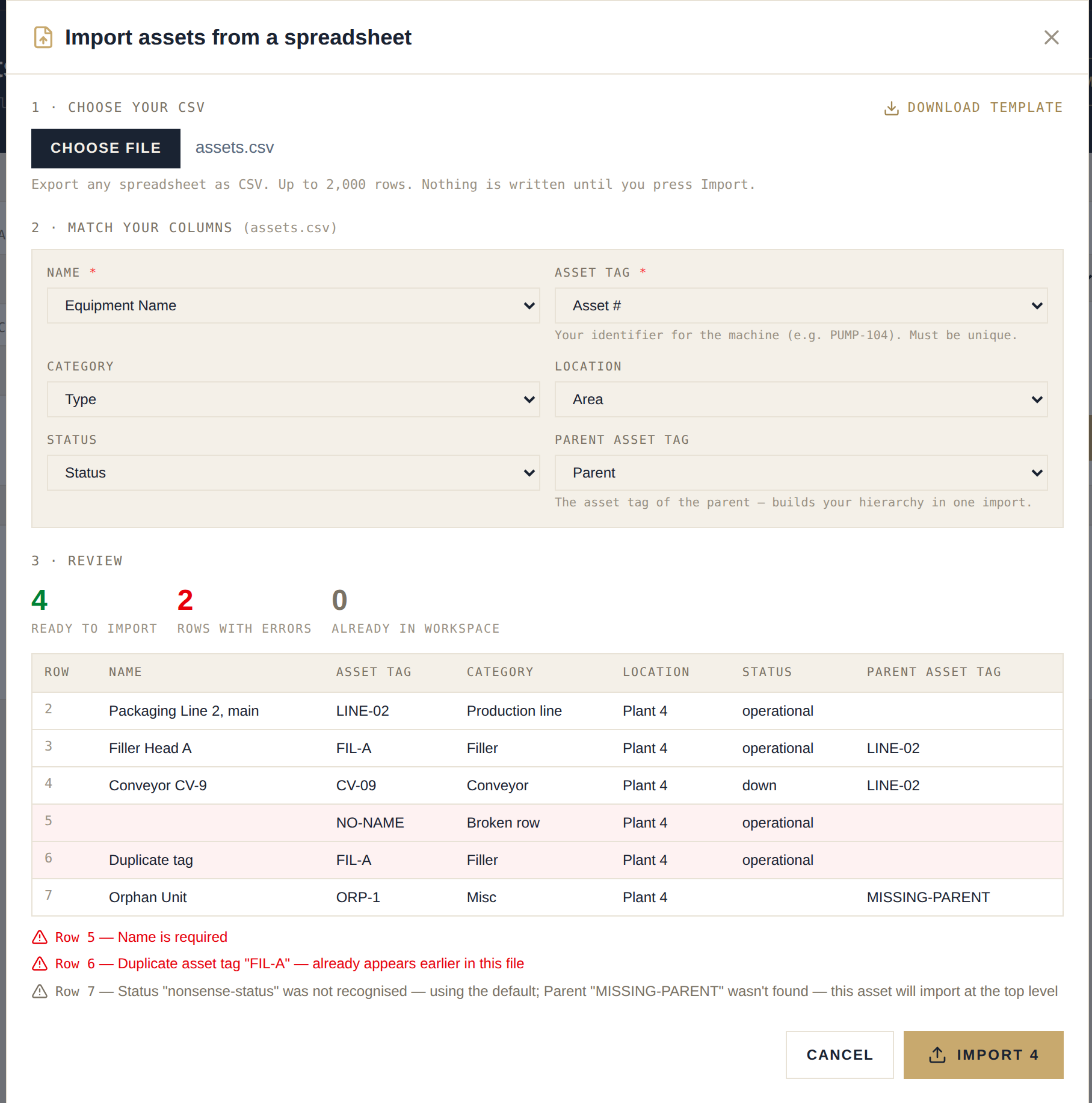
Three things are worth pointing out, because they're where most imports go wrong elsewhere.
Your column names are matched for you. You don't have to rename anything to match some documented schema. "Equipment Name", "Asset #", "Part No.", "Qty On Hand" — all recognised. Anything matched wrongly is a dropdown away from being corrected, and columns you don't care about just stay unmapped.
Nothing is written until you press Import. The preview shows each row exactly as it will be created, with a count of what's ready, what has errors, and what's already in your workspace. You're never guessing.
One bad row doesn't stop the file. This matters more than it sounds. Every real spreadsheet has a blank row, a duplicate, or a cell someone typed a note into. Problems are listed against the spreadsheet row number you can see in Excel — "Row 5 — Name is required" — and everything else still imports. Warnings are separated from errors, so an unrecognised status or a parent that isn't in the file uses a sensible default and imports anyway.
Then fix the flagged rows in your spreadsheet and upload the same file again. Rows already imported are skipped, not duplicated. That's the part that makes the whole thing low-stakes: you can iterate.
Step 3 — Parts, then PMs
Same process, two more files.
Parts want a name and a part number, plus quantity on hand, reorder point, bin location, and unit cost if you have them. Reorder points are the ones people leave blank and regret — they're what turns your parts list from a spreadsheet into a system that warns you before a stockout.
PM schedules want a task and a frequency. Two conveniences here: frequency accepts plain words, so monthly, quarterly and annual all work as well as a number of days; and if you put an asset tag in the row, the schedule attaches itself to that machine — which is why assets go first. Checklist steps go in one cell separated by |:
Task,Asset,Frequency,Priority,Checklist
Monthly gearbox inspection,GBX-07,monthly,medium,Check oil level|Inspect seals|Grease bearings
Quarterly line audit,LINE-02,quarterly,high,
That's a PM program with checklists, in a file you can write in ten minutes.
A few things that trip people up
- Import in order: assets → parts → PMs. PMs can only link to equipment that already exists.
- Asset tags must be unique. Duplicates are flagged rather than silently overwriting, which is what you want.
- Watch your number format. A European spreadsheet writes
1.234,50where a North American one writes1,234.50. Both are read correctly — but if you've hand-edited a file, check that a quantity of1.234means what you think it means. - Split anything over 2,000 rows. If you have more equipment than that, you're a bigger plant than this tool is built for, and you should say so before you start.
The realistic timeline
An afternoon. Genuinely.
Pulling your equipment list into shape is an hour or two if it exists in any form. Parts is another hour. PMs are quick because you're mostly writing down what people already do from memory — and that step is usually the most valuable part of the whole exercise, because it's the first time the program has been written down anywhere.
The result is a system that everyone can see, that reminds you what's due, and that doesn't live in one person's head.
Ready to move? Start a free 30-day trial — no credit card. Import your equipment list in the first ten minutes and see your own plant in it, not a demo. If you're still on spreadsheets and not ready to switch, the free Excel CMMS template will at least get your data into a shape that imports cleanly later, and how to run a CMMS in Excel walks through the workbook.