
Work order software
Work orders your crew will actually use.
Create, assign, and close maintenance work with checklists, photos, parts, labour hours, and failure codes — in a simple web CMMS built for small and mid-sized plants.
30 days · no credit card required
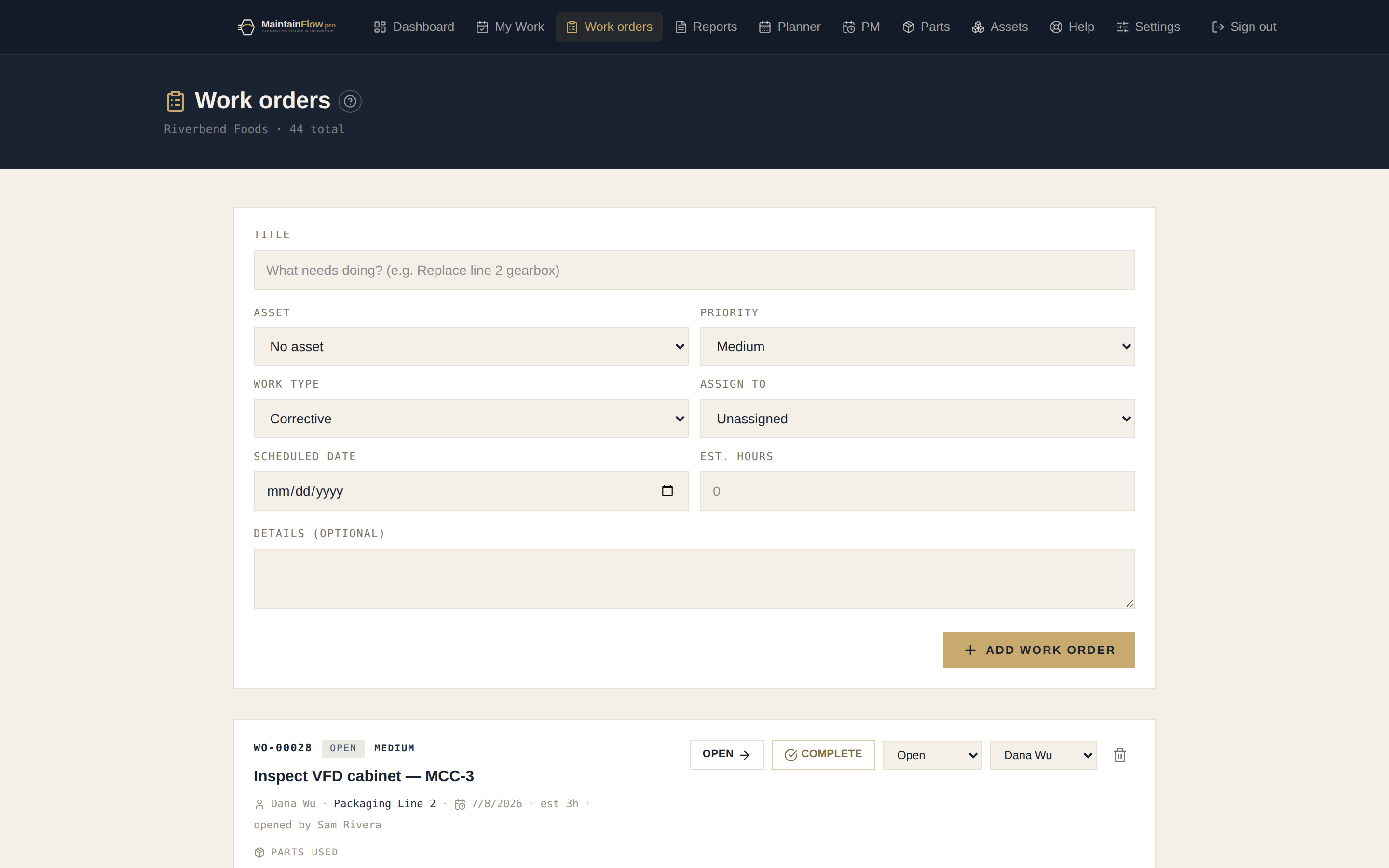
From “someone should fix that” to fixed — with a record.
Create and assign in seconds
Title, asset, priority, assignee, scheduled date — one short form, or the quick-action button from any screen. Every job gets a WO number and a history.
Assignment emails, automatically
When work is assigned, the technician gets an email with the job, the asset, and the schedule — no “check the whiteboard” required.
A technician view that fits a phone
My Work shows each tech today’s jobs first. Start a job, work the checklist, add photos, log hours, and close it — from the floor.
Close-out that captures what matters
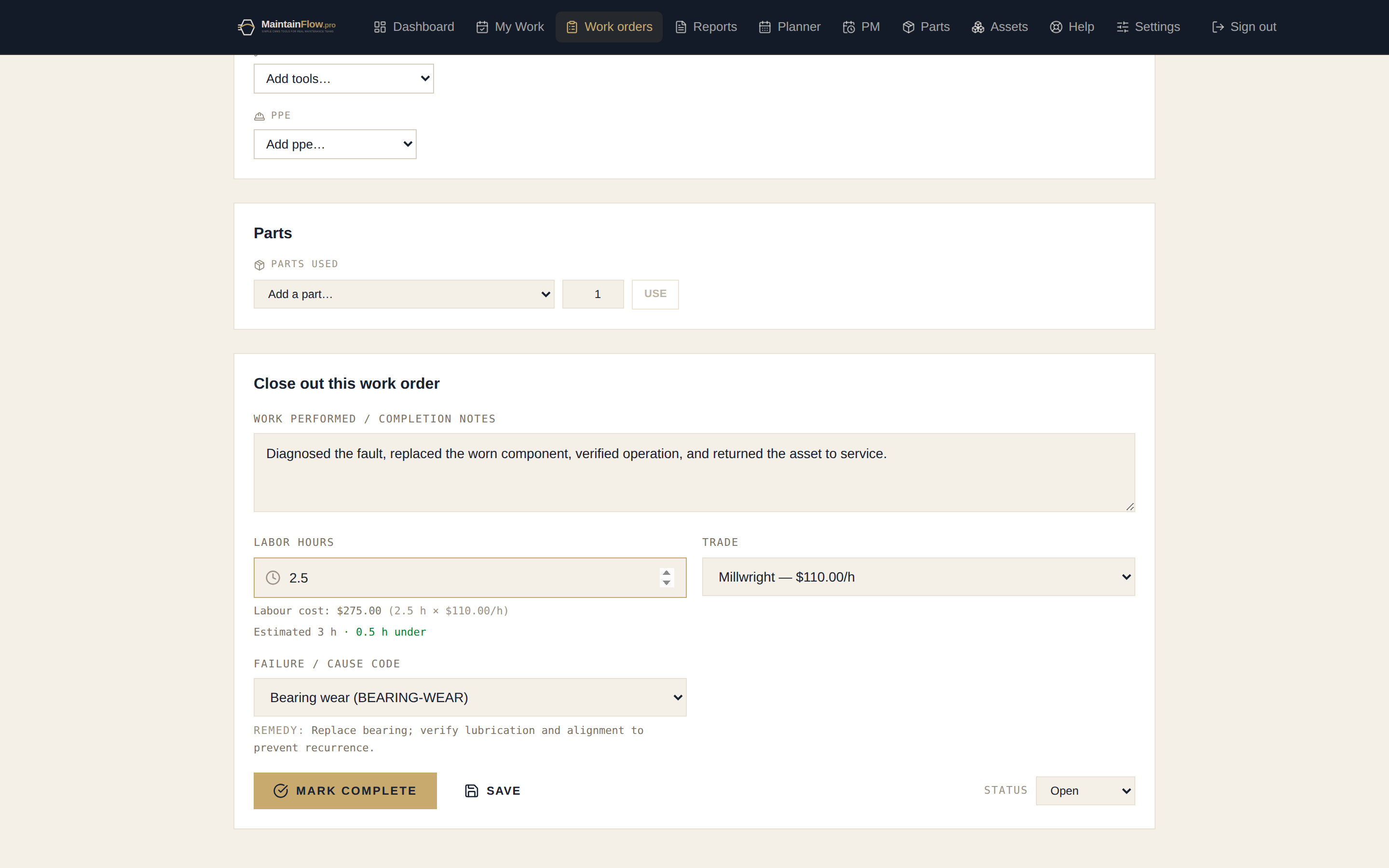
Completion notes, labour hours, trade, failure code, and parts used — the data that makes reliability numbers real, collected in the same motion as the work.
Planner board across the crew
A capacity-aware week view — who’s doing what, when, and who has room. Drag to reschedule; balance the load before Monday hits.
Backlog and KPIs on one screen
Open backlog, overdue work, completions, MTTR, and costs roll up automatically to the dashboard. Lead the morning meeting with numbers.
Close-out that feeds your reliability numbers.
Labour hours and trade set the job cost. The failure code feeds MTBF and your top failure modes. Parts used draw down inventory. One completion form — three systems’ worth of record-keeping.
The basics
What work order software actually does
A work order is simply a record of one job: what needs doing, on which machine, who is doing it, and what happened. Work order software is the system that holds every one of those records in one place and moves them through a predictable lifecycle — raised, approved, scheduled, worked, closed.
That sounds obvious, and it is. The reason plants still run on whiteboards and text messages is not that the concept is hard; it is that the first attempt at a system usually adds work without giving anything back. A maintenance manager types jobs into a spreadsheet all week and gets a spreadsheet at the end of it. The system has to return something the crew could not get otherwise, or people stop feeding it within a month.
What it should return is three things. First, nothing gets lost — every request becomes a numbered record with an owner, instead of living in somebody's memory until the machine stops again. Second, the history sits with the asset, so when a pump fails you can see what was done to it last time, what parts went in, and who did the work. Third, the numbers assemble themselves: backlog, overdue work, completion rate, mean time to repair and cost per asset all fall out of jobs your crew was closing anyway.
The catch is that all three depend on close-out data being captured at the moment the work is finished, not reconstructed on Friday afternoon. That is why the completion form asks for labour hours, a trade, a failure code on breakdown work, and the parts consumed — and why it has to be fast enough to fill in on a phone with gloves on. A system that collects perfect data nobody enters is worth less than a rough one everybody uses.
Spreadsheet vs. work order software
Most small plants are not choosing between two CMMS products — they are deciding whether to leave the spreadsheet at all. This is the honest comparison.
| Shared spreadsheet | MaintainFlow | |
|---|---|---|
| Two people at once | Version conflicts, or one person owns the file and everyone else asks them. | Everyone works in the same live record; changes are attributed and instant. |
| On the floor | Written on paper, typed up later — if it gets typed up. | Phone-first technician view; start, check off, photograph and close at the machine. |
| Asset history | Rows scattered across tabs and years; nobody scrolls back. | Every job, part and failure code attached to the machine, with sub-asset roll-up. |
| Knowing what is due | Someone has to remember to look. | PMs generate their own work orders; overdue and due-today surface on the dashboard. |
| Reporting | A manual exercise each month, so it happens rarely. | Backlog, MTTR, PM compliance and cost calculate continuously; export to PDF or CSV. |
| Cost | Free, plus the hours spent maintaining it and the jobs lost from it. | $15/user for managers, $10 for technicians, free unlimited requesters. |
How a job moves through the system
The whole product is one loop. If your plant already works this way informally, the software is mostly bookkeeping you no longer do by hand.
- 01
Someone raises it
An operator submits a request from a free requester account, a manager creates the work order directly, or a PM schedule generates it automatically. Emergency breakdowns get raised in one tap from the quick-action button.
- 02
A planner accepts and schedules it
Requests wait in an approvals inbox until a manager approves or declines them with a reason. Approved work is assigned to a technician and dropped onto a day on the planner board, which shows each person’s capacity so the week is not overbooked before it starts.
- 03
The technician works it
The job appears in their My Work list, today first. They start it, work through the checklist marking pass, fail or n/a, photograph what they find, and add the parts they consumed — which draws those parts out of inventory as they go.
- 04
Close-out captures the record
Completion notes, labour hours and trade set the job cost. On corrective and emergency work a failure code is required, because that single field is what makes failure analysis possible later. A failed checklist item automatically raises a follow-up work order so findings are never lost at close-out.
- 05
The numbers update themselves
Backlog, overdue counts, PM compliance, MTBF, MTTR and cost per asset recalculate from the work your crew just closed — no separate reporting step, and no month-end spreadsheet.
Fit
Who this is for — and who it isn't
MaintainFlow is built for small and mid-sized plants with a maintenance crew of roughly three to thirty people: food and beverage, plastics and packaging, metal fabrication, machine shops, warehousing. Teams where the planner also turns wrenches, there is no dedicated IT department, and nobody has six months for an implementation project.
It is not the right tool if you need multi-site enterprise asset management, purchase orders and vendor management, integration middleware into an ERP, or a configurable workflow engine. Those are real requirements for larger operations and there are products built for them — at prices and rollout timelines to match. Buying one of those for a ten-person crew is how plants end up with an expensive system nobody logs into.
The practical test: if your maintenance backlog currently lives on a whiteboard, in a shared spreadsheet, or in one experienced person's head, this is aimed squarely at you. If you already run a functioning CMMS and want more configuration depth, it is probably not.
Work order software FAQ
- What is work order software?
- A system that tracks every maintenance job from request to completion — who it’s assigned to, which asset it’s on, what parts and hours it took, and what caused the failure. It replaces whiteboards, paper tickets, and spreadsheets with one shared record.
- Can technicians use it on the shop floor?
- Yes — MaintainFlow runs in the browser on any phone or tablet. Technicians see today’s jobs first, start and complete work, add photos, and log hours without a laptop.
- Can people submit work requests?
- Yes. Requester accounts are free and unlimited — operators and supervisors can raise work orders, and your planners decide what gets scheduled.
- What does it cost?
- Full access (Owner/Admin/Manager) is $15/user/month, technicians are $10, and requesters are free. The 30-day trial includes everything, with no credit card.
- How is work order software different from a shared spreadsheet?
- A spreadsheet holds the list; it does not enforce the process. Work order software gives every job a number and an owner, stops two people overwriting each other, works on a phone at the machine, keeps history against the asset rather than in rows nobody scrolls to, and calculates backlog, overdue work and cost automatically. The moment more than one person needs to update it, or a technician needs it on the floor, the spreadsheet starts losing data.
- Do we have to approve every work request?
- Only if you want to. Requesters (free, unlimited) submit requests that land in an approvals inbox, so operators can report problems without anyone being able to inject work straight into the schedule. Managers and technicians create work orders directly. If approvals feel like overhead, give people technician accounts instead and skip the queue.
- Can we import our existing equipment list and open jobs?
- Assets, spare parts and PM schedules import from CSV — export whatever spreadsheet you have today, and the column names are matched automatically. We deliberately suggest not importing years of closed work orders: it is rarely searched, usually incomplete, and the cleanup time is better spent getting the current week under control.
- What happens to our data if we stop paying?
- Your workspace drops to read-only rather than locking you out — everything stays visible and exportable to CSV. Your maintenance history is yours; the subscription buys the ability to log new work, not access to what you already recorded.
Get the backlog out of your head.
Full access for 30 days. No credit card. Set it up this afternoon.
Start your 30-day free trial