
Preventive maintenance software
Preventive maintenance software that runs the schedule for you.
MaintainFlow turns your PM program into automatic, checklist-backed work orders — and tracks PM compliance while your crew works. Built for small and mid-sized plants moving off spreadsheets and whiteboards.
30 days · no credit card required
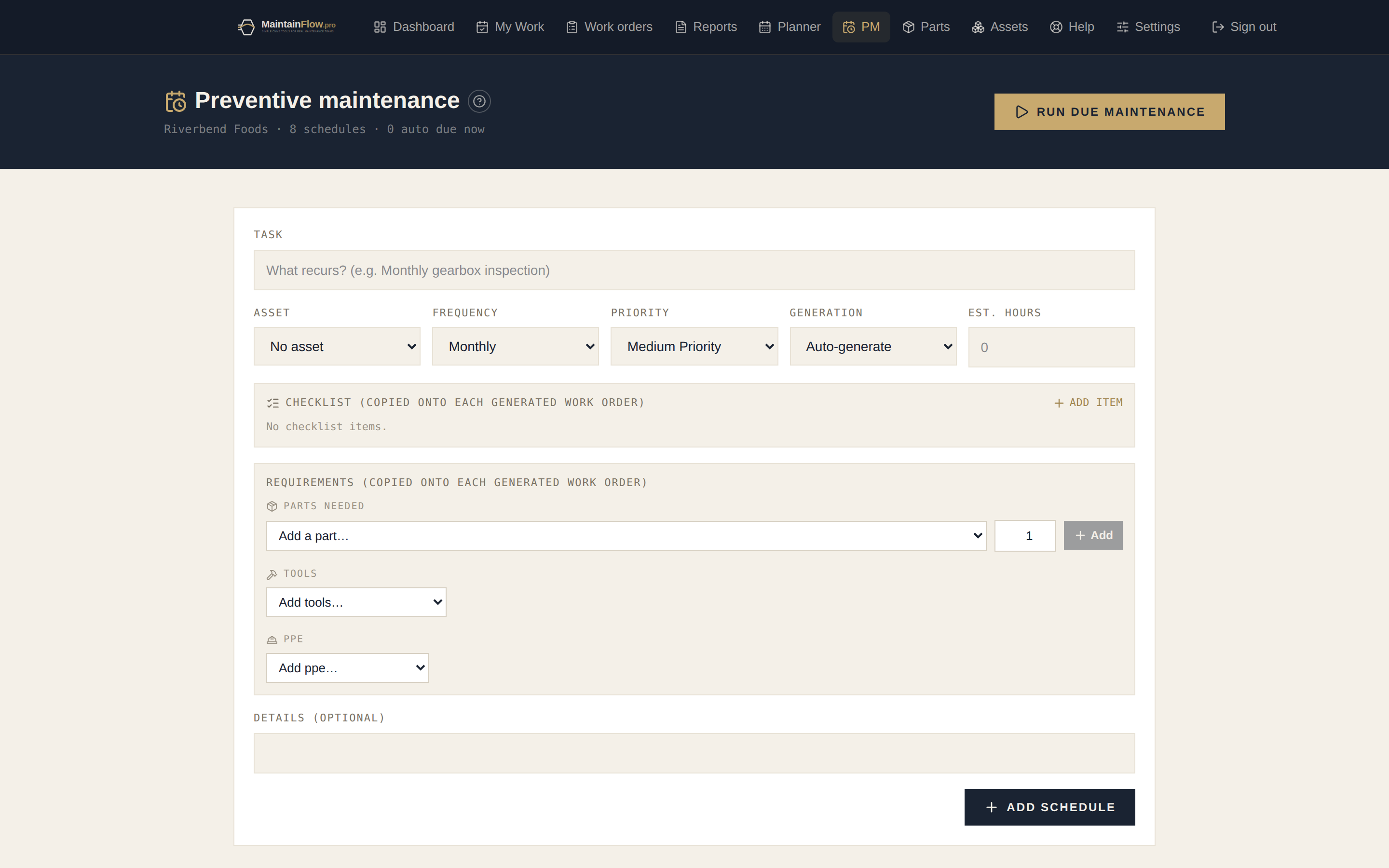
How automatic preventive maintenance works
1 · Set the schedule once
Pick the asset, the frequency (weekly to annual) or a meter interval (every 250 run-hours, cycles, or km — whichever comes first), the checklist, and the parts the job needs. That’s the whole setup.
2 · Work orders generate themselves
When a PM comes due, MaintainFlow raises the work order automatically — assigned, scheduled, checklist attached. Nothing slips because nobody remembered.
3 · Compliance tracks itself
PM compliance, preventive-vs-corrective ratio, MTBF and MTTR calculate from the work your team actually closes. No spreadsheet math.
- Checklists on every PM — pass / fail / n/a with notes, so inspections leave a record.
- Required parts, tools, and PPE on the schedule — the job arrives kitted, with a stock check.
- On-time completions push the next due date out a full cycle — overdue PMs are visible immediately.
- Meter-based triggers — track run-hours, cycles, or km on an asset and PMs fire on usage, whichever comes first with the calendar. Technicians record the meter at close-out.
The basics
What preventive maintenance software is for
Preventive maintenance is work you do before something fails — lubrication, inspection, filter changes, alignment checks, calibration. The theory has never been controversial. The difficulty has always been administrative: knowing what is due, on what, this week, and proving afterwards that it happened.
That is the entire job of preventive maintenance software. A PM schedule is a template — an asset, a frequency, a checklist, the parts and tools the job needs — and the system turns that template into a real work order on time, every cycle, without anyone remembering. When the job is closed, the schedule advances and the compliance record writes itself.
The reason this matters more than it sounds: PM work is the first thing sacrificed when a plant is busy, and it is invisible when it is skipped. Nobody notices a missed lubrication route on the day. They notice the bearing failure six weeks later, which arrives as an emergency, at the worst possible moment, costing several times what the lubrication would have. A program that generates its own work orders removes the decision from the busy week — the job simply exists, and skipping it becomes a visible choice rather than a quiet omission.
The honest limitation is that software cannot make a bad program good. If the frequencies are guesses, the checklists are vague, or the schedules cover machines that do not matter, you will generate a lot of work orders and improve nothing. The value comes from a small, deliberate program executed consistently — the software makes consistency cheap, not the thinking.
Three ways to decide when work is due
Most small plants run everything on the calendar because it is the only thing a spreadsheet can track. It is the right default for steady equipment and the wrong one for the rest.
| How it triggers | Best suited to | |
|---|---|---|
| Calendar-based | A fixed period since the last completion — every 7, 30, 90 or 365 days. | Equipment that runs a predictable pattern, and anything time-degraded regardless of use: seals, lubricants, statutory inspections. |
| Meter-based | Accumulated usage since the last service — run-hours, cycles, kilometres, units produced. | Equipment whose duty varies week to week: compressors, pumps, forklifts, seasonal lines. This is what OEM manuals usually specify. |
| Whichever comes first | Both legs armed at once; the schedule fires on the earlier of the two and re-anchors both. | Almost everything with a meter. It catches heavy use early and still services a machine that sat idle for a quarter. |
| Condition-based | Triggered by a measurement crossing a threshold — vibration, temperature, oil analysis. | High-value rotating equipment where monitoring pays for itself. MaintainFlow does not automate this; readings and findings are logged as inspection work. |
Building a PM program that survives contact with a busy week
The order matters. Most failed programs are failed in the first two steps, not in the software.
- 01
Start with criticality, not with everything
List the machines that stop production, endanger someone, or cost the most when they fail. Ten to twenty assets is a normal starting point for a small plant. Everything else can wait — you are trying to reach consistent completion, not coverage.
- 02
Write the frequency you can actually hit
Take the OEM interval as a starting point, then adjust for how hard you run the machine and how much labour you genuinely have. A monthly inspection completed every month beats a weekly one completed every third week, both for the equipment and for the crew’s belief in the program.
- 03
Make the checklist specific enough to be useful
“Inspect gearbox” tells you nothing afterwards. “Check oil level against sight glass”, “Inspect input seal for weeping” and “Record housing temperature” produce a record you can compare over time — and a failed item automatically raises its own follow-up work order.
- 04
Attach the parts and tools before the first run
A schedule that carries its required parts, tools and PPE turns into a work order the technician can actually start. Without them, half your PM time is spent walking to the storeroom, and the program earns a reputation for wasting the day.
- 05
Let it generate, then watch compliance for a quarter
Schedules generate their work orders automatically overnight. After three months, compare completion against due dates: schedules you consistently miss are either the wrong frequency or the wrong priority, and both are worth fixing before adding new ones.
Preventive maintenance software FAQ
- How does automatic PM generation work?
- Every night MaintainFlow checks your PM schedules and creates work orders for anything that has come due — assigned, scheduled, and carrying the checklist and required parts you defined. You can also generate due PMs on demand with one click.
- Does MaintainFlow support meter-based (usage-based) PMs?
- Yes. Enable a usage meter on an asset — run-hours, cycles, kilometres — and any PM on that asset can take a meter interval, like “every 250 hours”. The schedule fires on whichever comes first, the calendar or the meter, exactly like an OEM manual specifies. Readings are logged on the asset page or right in the work-order close-out, and a reading that crosses the interval raises the work order immediately.
- Can I track PM compliance?
- Yes. PM compliance (on-time completions vs due), preventive-vs-corrective ratio, MTBF, and MTTR are calculated automatically on the dashboard from your closed work orders.
- What frequencies are supported?
- Any interval in days — weekly, bi-weekly, monthly, quarterly, semi-annual, annual, or a custom cycle. Each schedule is tied to an asset in your equipment hierarchy.
- How long does it take to set up a PM program?
- Most small plants enter their critical assets and first PM schedules in an afternoon. Start with the machines that hurt most when they go down, then grow the program from there.
- How many PMs should we actually have?
- Fewer than most people expect at the start. A common failure is writing two hundred schedules in week one, missing most of them, and concluding the program does not work. Begin with the ten to twenty machines whose failure actually stops production, give each one or two schedules, and get to consistent completion before adding more. A small program you hit is worth more than a large one you ignore.
- What is the difference between calendar-based and meter-based PMs?
- Calendar PMs come due after a fixed period — every 30 days, every quarter. Meter-based PMs come due after a machine has actually been used a set amount, such as every 250 run-hours or 10,000 cycles. Calendar schedules over-service equipment that sat idle and under-service equipment that ran double shifts; meter triggers fix both. MaintainFlow supports either, or both at once on a whichever-comes-first basis, which is how most OEM manuals specify service.
- What is a good PM compliance target?
- Above 90% of PMs completed on time is a healthy program; below roughly 80% means you are still mostly reacting and the schedule is fiction. The number only means something if the underlying schedules are realistic — inflating compliance by writing PMs nobody needs is the most common way the metric gets gamed.
- Do PM work orders get assigned automatically?
- Yes, if you want. A schedule can carry a default assignee, so generated work lands directly in that technician’s queue with the checklist and required parts attached. Leave it blank and generated work arrives unassigned for a planner to distribute on the board.
Put your PM program on autopilot.
Set your first schedule this afternoon — the next work order raises itself.
Start your 30-day free trial