
Maintenance scheduling software
Maintenance scheduling your crew can actually keep.
A capacity-aware planner board for small maintenance teams — who’s doing what, when, and who has room. Drag to reschedule, balance the load, and catch overbooked days before Monday hits.
30 days · no credit card required
Maintenance planning that respects capacity
A board built around your crew
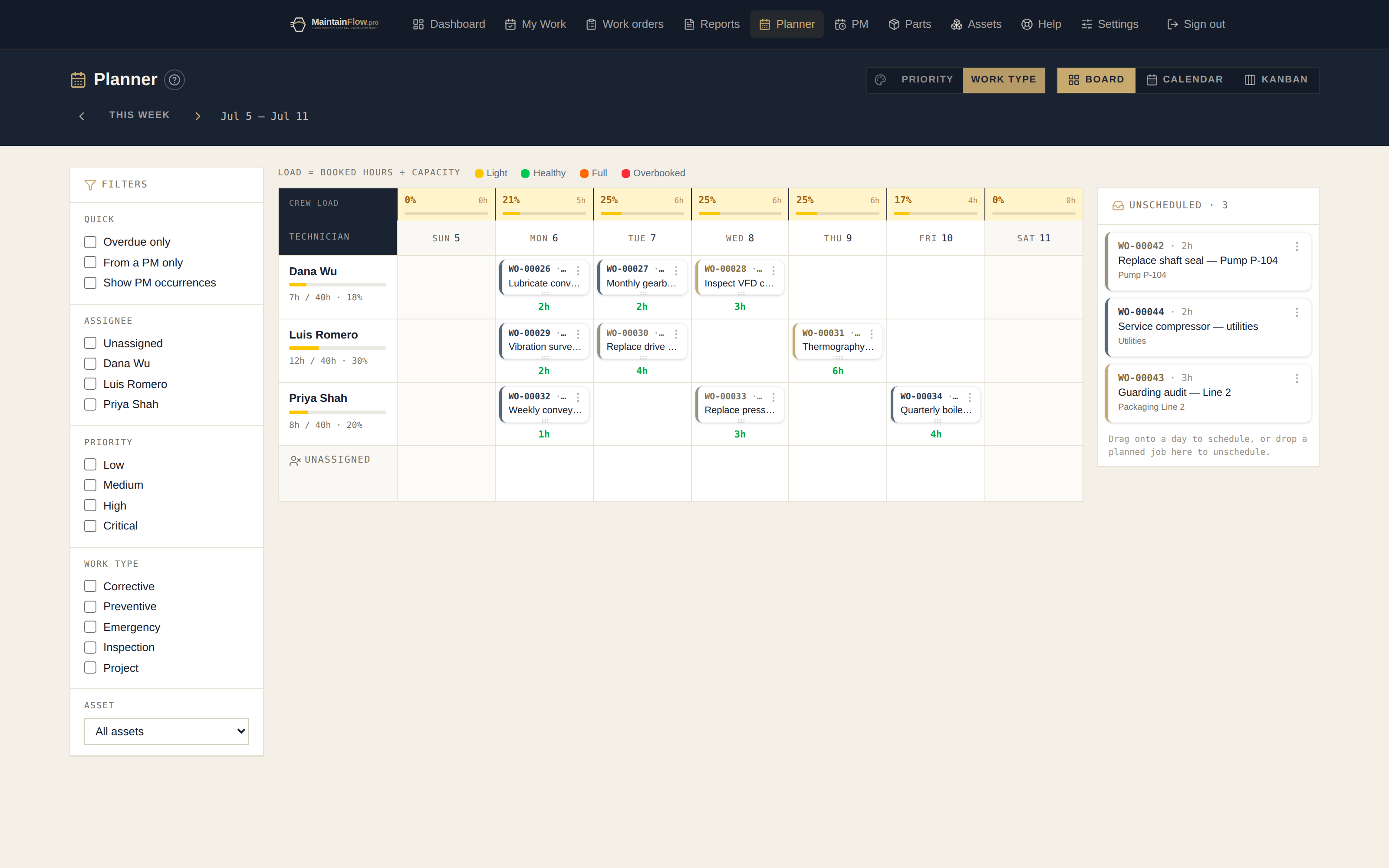
Rows are your technicians, columns are the week. Every job sits where it will actually happen — and unscheduled work waits in the backlog tray.
Capacity on every cell
Set your weekly hours once and every day shows load against capacity. Overbooked cells flag themselves before the week starts, not after it fails.
A workload heat map
One strip shows the whole crew’s week at a glance — light, normal, busy, or over. Balance the load by looking, not by spreadsheet math.
Drag to reschedule
Move a job to another day or another tech by dragging it. Resize to change the estimate. The change saves as you drop it.
Smart technician suggestions
Suggested assignees ranked by who has done this asset, this work type, and this trade before — with current workload as the tiebreaker.
Calendar, kanban, and agenda views
The same week as a month calendar, a status kanban, or a simple agenda list for phones. PM due dates project onto the board before they generate.
The basics
Why maintenance schedules fail
Every plant has a maintenance schedule. Most of them are fiction by Thursday. The list says twelve jobs will happen this week, the crew has hours for seven, and by the end of the week everyone has quietly agreed to stop looking at it.
The schedule did not fail because people were lazy. It failed because it never respected capacity. A list of work is not a plan. A plan is work matched against the hours available to do it — and a list, by its nature, hides the one number that decides whether the week is realistic.
That is the entire argument for maintenance scheduling software: it is not a prettier to-do list, it is a different shape. Technicians across the top, days down the side, every job carrying an hour estimate, and a running total per person per day against what that person actually has. The moment Tuesday reads 9.5 hours against a 6-hour plan, the problem is visible on Friday instead of being discovered on Tuesday afternoon.
The second thing a board fixes is quieter but just as costly: the hero column. In most crews one technician is chronically overloaded and another is not, and nobody notices because the work is distributed by habit rather than by plan. Laid out side by side, it takes about four seconds to see — and about the same to fix by dragging two jobs across.
A list versus a board
Both hold the same jobs. Only one of them tells you whether the week is possible.
| Work order list | Planner board | |
|---|---|---|
| What it answers | What needs doing. | What needs doing, by whom, on which day — and whether that person has the hours. |
| Overbooking | Invisible until the day arrives and the work does not get done. | Each cell totals its estimated hours against capacity and flags overload before the week starts. |
| Uneven load | Hidden — assignment happens by habit. | One glance across the columns; drag a card to rebalance. |
| Preventive work | Competes with corrective work for attention and usually loses. | Upcoming PM due dates project onto the board before they generate, so fixed workload is placed first. |
| Rescheduling | Edit a date field, if anyone remembers to. | Drag the card to another day or another technician; it saves as you drop it. |
| When a breakdown lands | Displaced work vanishes from the plan. | You move the displaced jobs explicitly, so the cost of the interruption is visible. |
The fifteen-minute weekly planning ritual
The board is only half of it. Plants that keep this ritual outperform plants with expensive software they never sit down with.
- 01
Close out last week honestly
Mark what actually finished, with real labour hours next to the estimate. Those actuals are what make next quarter’s estimates trustworthy, and the gap between estimated and actual is the most useful planning feedback you will get.
- 02
Place the fixed work first
PMs due this week and any statutory or safety-driven inspection go onto the board before anything else. If preventive work only gets scheduled when there is room left over, there is never room left over — and you pay for it in breakdowns a month later.
- 03
Fill to the capacity line, then stop
Add high-priority corrective work until each technician’s day reaches its planned hours — around 60–75% of available time, not 100%. The remainder is what absorbs the breakdowns you cannot forecast. Stopping here is the discipline the whole method rests on.
- 04
Roll the rest forward deliberately
Anything that does not fit stays in the backlog on purpose, not by accident. Unscheduled work that is visibly unscheduled gets resourced eventually; work that quietly slipped looks like it is still planned and never does.
- 05
Rebalance across the crew
Scan the columns for the chronically red one. Move two jobs. This takes under a minute and is usually the single highest-value adjustment in the whole session.
Maintenance scheduling FAQ
- What is maintenance scheduling software?
- A planning tool that lays the maintenance workload across your technicians and the week — so every job has an owner and a day, capacity is respected, and nothing sits forgotten in a backlog. In MaintainFlow it is built in alongside work orders, PM, and parts.
- Can it prevent overbooking?
- Yes. You set weekly capacity hours per technician, and the board computes daily load against capacity — overloaded days are flagged on the cell and on the crew heat map before the week begins.
- How does rescheduling work?
- Drag a job to a different day or technician and it saves on drop. You can also set the date directly, send a job back to the unscheduled backlog, or resize a card to change its time estimate.
- Does it work with preventive maintenance?
- Yes — upcoming PM due dates project onto the planner so you can see the fixed workload before the work orders generate, and generated PM jobs land on the board like any other work.
- How much of a technician’s day should you actually schedule?
- Plan to roughly 60–75% of available hours, not 100%. Breakdowns, parts runs and “while you are here” requests consume the rest whether you planned for them or not. A board filled to eight hours a day is not an ambitious schedule, it is a schedule that will be wrong by Tuesday — and once a plan is visibly wrong, people stop following it at all.
- What if we do not have hour estimates for our jobs?
- Use rough ones. “About two hours” is enormously better than blank, because blank is what lets a day silently absorb fourteen hours of work. Log actual labour hours at close-out and your estimates become accurate within a couple of months — the system shows estimate versus actual on every completed job.
- Who should be schedulable on the board?
- Only technicians appear as rows on the planner. Owners, admins and managers plan and assign work but are not scheduling resources — putting them on the board inflates apparent capacity and hides the fact that the crew is overbooked.
- What happens to work that does not get done this week?
- It stays in the backlog rather than silently rolling over. During the weekly review you deliberately place it on a day that has room, or leave it unscheduled and visible. The distinction matters: work that quietly slides looks like it is still planned, which is how a backlog grows without anyone noticing.
Stop planning the week in your head.
Full access for 30 days. No credit card. Your first board takes minutes.
Start your 30-day free trial